This step-by-step guide to how to start a blog in Australia covers niche selection, domain registration, hosting setup, WordPress installation, and the monetisation strategies that Australian bloggers use to earn $1,000–$5,000/month.
How to Start a Blog in Australia: Step-by-Step Guide for Beginners
Starting a blog in Australia is one of the most accessible ways to build passive income online — but most tutorials skip the Australian-specific details that actually matter.
This guide covers everything: picking a niche, choosing hosting, setting up WordPress, writing content, and making money.
💰 How Much Can You Actually Make Blogging in Australia?
Realistic timelines:
- Months 1–6: $0 (building foundation)
- Months 6–12: $50–$500/month (first affiliate commissions)
- Year 2: $500–$3,000/month with consistent publishing
- Year 3+: $3,000–$10,000+/month from compounding organic traffic
Blogging is one of the few online income streams that genuinely scales passively once it’s built.
1️⃣ Step 1: Pick a Niche
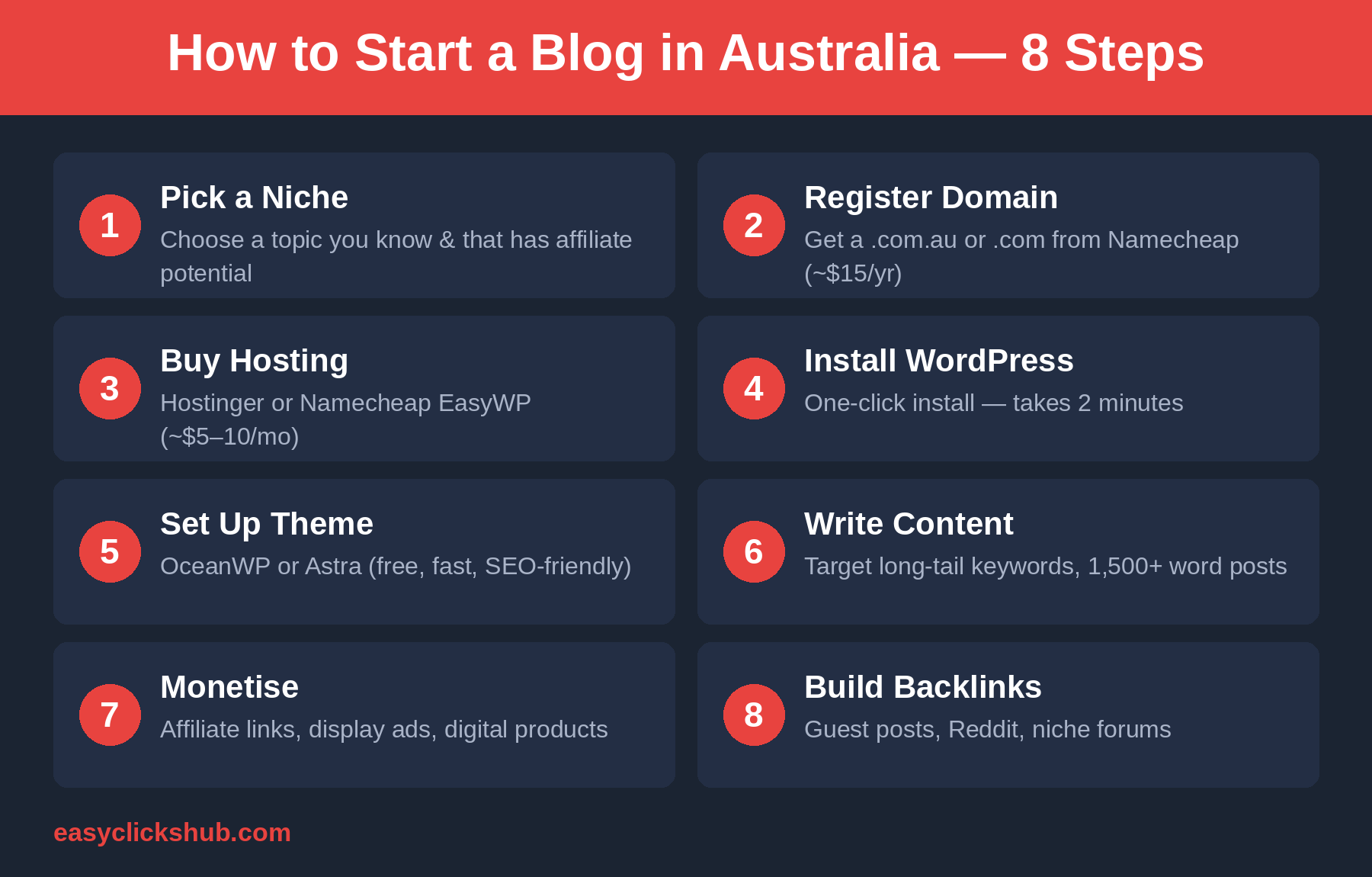
The most common mistake new bloggers make is being too broad. Google favours topical authority — going narrow and deep beats going wide.
Profitable niches for Australian bloggers:
- Personal finance — budgeting, investing, superannuation
- Passive income and side hustles — survey sites, cashback apps, freelancing
- Parenting — strong Australian audience, good CPM for display ads
- Local travel — underserved compared to international travel blogs
- Health and fitness — high traffic, monetises well
2️⃣ Step 2: Register a Domain Name
Where to register: Namecheap is consistently the best value. A .com costs around AUD $14/year and they include free WhoisGuard privacy protection — something most registrars charge extra for.
3️⃣ Step 3: Choose Hosting
For a new blog (0–10,000 monthly visitors), you need reliable uptime, fast load times, and a simple control panel.
Best Hosting Options for Australian Bloggers in 2026
Namecheap Shared Hosting — Around AUD $3–5/month. Cheapest reliable option. Good for new sites.
Bluehost — Around AUD $8–12/month. Most recommended for WordPress beginners worldwide. One-click WordPress install.
Cloudways — From AUD $14/month. Significantly faster performance. Better for growing sites.
Hostinger — From AUD $4–7/month. Great intro pricing, modern interface.
Recommendation: Start with Namecheap or Bluehost. Upgrade to Cloudways when you outgrow shared hosting.
4️⃣ Step 4: Install WordPress
WordPress powers 43% of all websites. Every host above offers one-click installation:
- Log into your hosting control panel
- Find the WordPress or CMS Installer
- Click install, choose your domain, set your admin credentials
- Done — WordPress is live in about 5 minutes
5️⃣ Step 5: Set Up Your Theme and Plugins
Recommended free themes: Astra, OceanWP, GeneratePress.
Essential plugins:
- Rank Math — best free SEO plugin
- LiteSpeed Cache or WP Rocket — site speed
- UpdraftPlus — automatic backups
- Akismet — spam protection
6️⃣ Step 6: Write Content That Ranks
The three types of posts every blog needs:
1. Informational posts — “How does X work?” Builds topical authority.
2. Review posts — “Is X worth it?” Converts to affiliate sales.
3. Comparison posts — “X vs Y Australia.” Captures buyers deciding between options.
Content tips for Australian bloggers:
- Use Australian spellings: colour, favour, recognise, travelling
- Reference AUD pricing and Australian context
- Aim for at least 1,200 words per post
- Include the current year in titles for freshness signals
7️⃣ Step 7: Monetise Your Blog
1. Affiliate marketing — fastest path to first dollar. Promote hosting, finance tools, or survey platforms.
2. Programmatic advertising — Google AdSense (no minimum), Mediavine (50,000 sessions/month required).
3. Sponsored content — starts once you reach 5,000+ monthly visitors.
4. Digital products — ebooks, courses, templates. Highest margin but needs an audience first.
8️⃣ Step 8: Build Backlinks
- Guest posting on related Australian blogs
- Participating in Reddit communities (r/AusFinance, r/PersonalFinanceAU)
- Creating useful tools or data-driven content others want to link to
How Long Until Results?
Google takes 3–6 months to rank new content. Most bloggers who quit do so in months 2–4 — right before traffic would have arrived.
What to Do While You Wait
- Online surveys — earn small amounts while your blog grows. See our guide to the best paid online surveys for Australians.
- Freelance writing — write for other blogs while building your own
- Pinterest or Instagram — build social traffic before Google kicks in
Final Word
Starting a blog in 2026 is still worth it — but only if you treat it like a business from day one. Pick a niche, get reliable hosting, write keyword-targeted content, build links, and stay consistent.
The bloggers earning good money in 2027 are the ones who start today.
Ready to get online?
We host Easy Clicks Hub on Hostinger ourselves — this very site runs on it. Sign up through our link and you’ll get a discount on your first plan; we may earn a referral bonus at no extra cost to you.
Related reading: Namecheap Review Australia, Best Cheap Web Hosting Australia, and Passive Income Ideas Australia.